The FieldDesk Link RSZ Presence Registration is a service specifically for construction companies in Belgium. The link can generate a presence registration of people who perform construction work. This presence registration is compulsory in Belgium for construction works with a total cost of at least 800,000 euro (ex VAT).
Basic necessities
You should enter your company number in FieldDesk. Your company number will be used in reporting of your employees. Enter your company number in the field 'Payroll number' in the [Management, Configuration, Company] screen. In this same screen in the 'Email address contact' field, enter the email address of the employee who should be notified about problems with the automatic sending of the site notification. When mistakes occur in reporting to the RSZ (e.g. RSZ site number is incorrect) an email will automatically be sent to this email address.
Next you should, for each employee for whom you would like a site notification to be performed, enter the national registration number or limosa number in FieldDesk. This is done in the [Management, Manage Employees] screen. Enter the national registration number in the field ‘BSN number’ in the tab ‘Personal Data’. In case of an employee without national registration number you could enter the limosa number in the ‘Limosa Number’ field in the tab 'Customer Specific Columns’.
If you have multiple companies, you can enter an alternative company number (deviating from the number entered in the [Management, Configuration, Company] screen) for the employee in the "Company Number" field in the tab ‘Customer Specific Columns’.
FieldPlan
When you have entered your basic necessities you can start registering the sites in the FieldPlan module. Open the FieldPlan module and navigate to the [Manage Projects] screen. Here you can add a new project by clicking on the ‘Add’ button at the lower right of the screen. You can use your own site number in the 'Project Number' field. The RSZ site number can be entered in the tab 'Free Project Fields’ in the 'RSZ Site Number' field.
Next you can create one or more locations per project (site). Navigate to the tab 'Project Locations' and create a POI. You need to demarcate the area of your site. This can be done by means of a circle or a polygon POI.
Daily check
In order to check daily whether registration occurs properly you can check in the FieldMap module whether the employees are in the project POI's you created. Navigate to the FieldMap module and click on 'Track 'n Trace' and next on 'Show on Map'. On the map you should then activate the POI's including the area: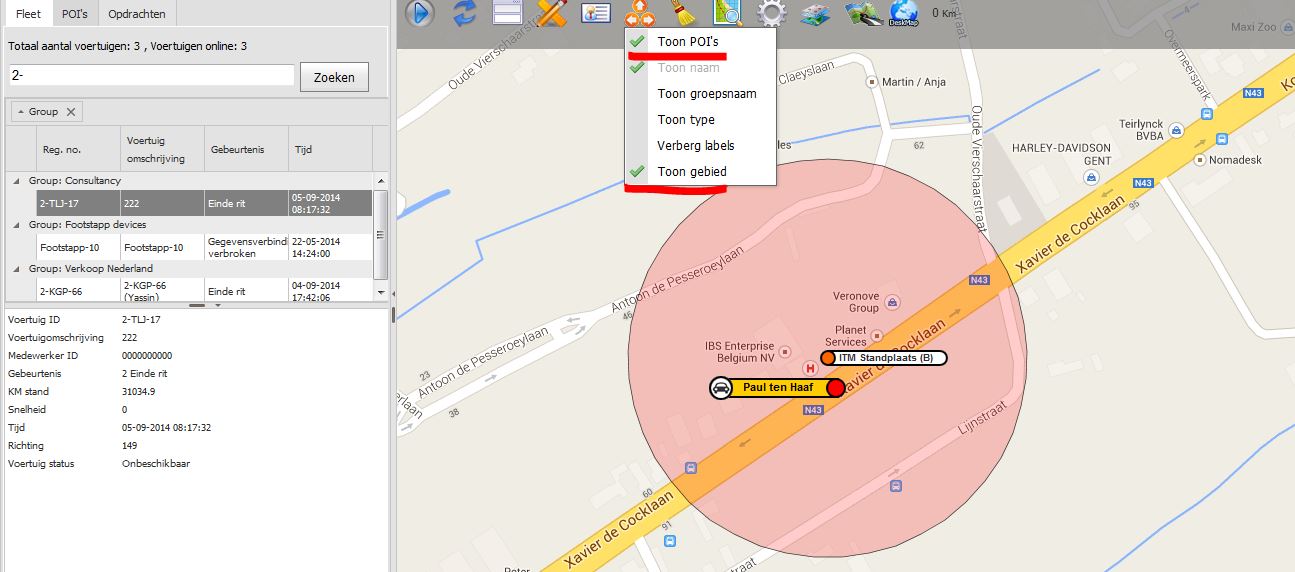
If necessary adjust the label of the vehicle to 'Employee Name' to see what employee was last registered in the vehicle. When the vehicle icon is in the red area and the vehicle icon is black (ignition is off) Fleet Complete will send a site notification immediately.
CheckIn@Work
The generated presence registration can be viewed and changed at the CheckIn@Work website of the RSZ. www.socialsecurity.be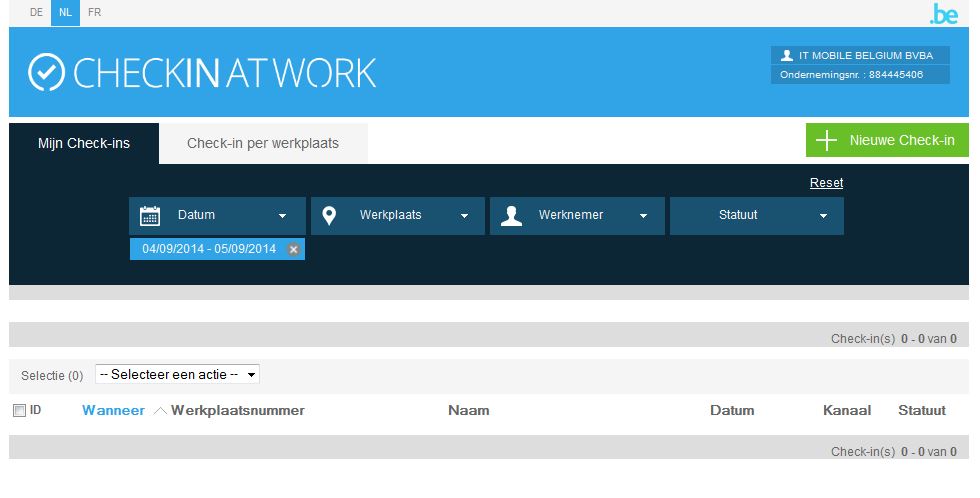
Here you will find all registration that were sent by Fleet Complete. You can view these registrations and if necessary amend them. In addition it is possible to manually add extra registrations.
Op deze pagina:
Labels